Goods Receipt from Vendor
Create an Inbound Delivery
Use
This activity is performed to create an Inbound Delivery.
Procedure
1. Access the transaction using any of the following navigation options:
| SAP menu |
Logistics Execution → Inbound Process → Goods Receipt for Inbound Delivery → Inbound Delivery → Create → Single Documents |
| Transaction code |
VL31N |
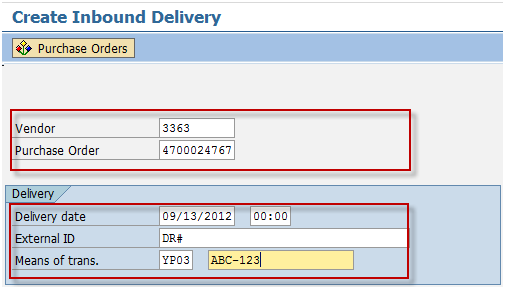
2. On the
Create Inbound Delivery Initial Screen, make the following entries then press
Enter.
| Field Name |
User action and values |
Comment |
| Vendor |
|
Required |
| Purchase Order |
|
Required |
| Delivery |
|
|
| Delivery Date |
|
Required |
| External ID |
DR# |
Required |
| Means of Trans. |
Van / Truck Plate # |
Required |
3. On the
Inbound Delivery Create: Overview screen click the
Header Details 
icon.
4. On the
Inbound Delivery Create: Header Details screen, go to
Shipment tab and make the following entries as applicable:
| Field Name |
User action and values |
Comment |
| BillOfLad. |
|
Waybill |
5. On the
Inbound Delivery Create: Header Details screen, go to
Text tab and make the following entries as applicable:
| Field Name |
User action and values |
Comment |
| Transport Information |
|
Optional |
| Reference Number |
|
Optional |
| VQC Number |
|
Optional |
| CA Number |
|
Optional |
| Padlock |
|
Optional |
| Arrival Date |
|
Optional |
| Arrival Time In |
|
Optional |
| Arrival Time Out |
|
Optional |
| Unloading Date |
|
Optional |
| Unloading Time In |
|
Optional |
| Unloading Time Out |
|
Optional |
6. Click the
Save 
icon.
Result
An inbound delivery number is created.

 Business Process ProceduresPreview in PDF